

TaskbarList
A compact launcher for Windows. Pin it to the taskbar, fill it with the apps, files and folders you use every day, and open any of them in one click.

Coming soon to the Microsoft Store. For Windows 10 (version 1809 or later) and Windows 11.

Pick a look
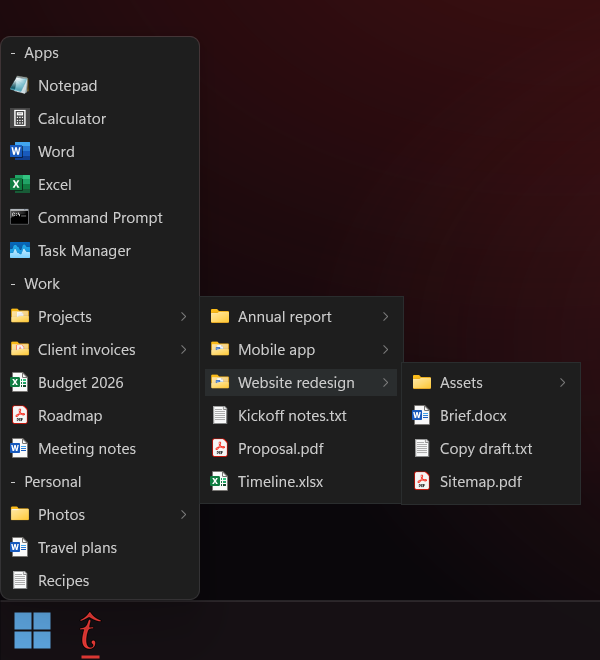
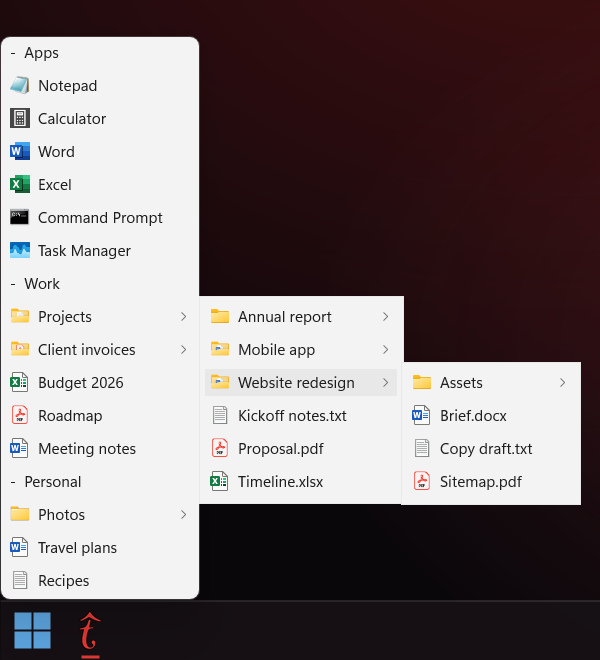
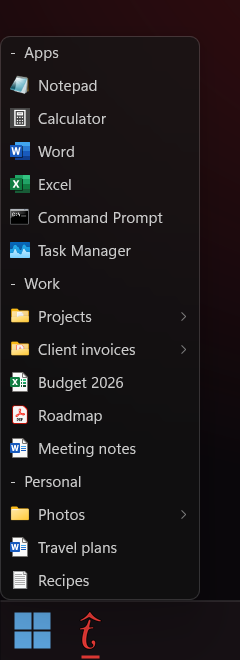
Follow the Windows theme, or choose Light, Dark or Aero with acrylic blur.
What it does
Everything you reach for, without hunting through Start, Explorer or a crowded desktop.
- Groups
- Sort items into named groups and collapse the ones you don't need right now.
- Folders you can browse
- Rest the pointer on a folder and its contents open next to it, level after level, without leaving the list.
- Open several at once
- Middle-click an item to open it and keep the list open for the next one.
- Drag and drop
- Reorder items and groups by dragging them. Drop files from Explorer onto the list to add them.
- Themes
- System, Light, Dark or Aero, with adjustable opacity and blur, and the text size you prefer.
- Instant from the tray
- Keep TaskbarList running in the notification area and it opens instantly. Start it with Windows if you like.
- Keyboard friendly
- Arrow keys move through the list and into folders, Enter opens, Esc closes.
- Private by design
- Your list stays on your PC: no account, no telemetry, no ads. Export it to a file to move it to another PC.
How it works
Set up once, then it's always one click away.
-
Pin it
The first time you open TaskbarList, it walks you through pinning it to the taskbar.
-
Fill it
Right-click the list to add apps, files, folders or groups, or drag files onto it.
-
Open in one click
Click the taskbar icon: the list opens right above it and closes when you click anywhere else.
Questions
Does TaskbarList collect any data?
No. Your list, groups and settings are stored only on your PC, in TaskbarList's own data folder, and are never sent anywhere. There is no account and no telemetry. The Privacy Policy has the details.
How do I pin it to the taskbar?
The first-run screen has a Pin to taskbar button, which is also in Settings. You can always open Start, right-click TaskbarList and choose Pin to taskbar.
Can I use it on more than one PC?
Yes. Your Microsoft Store purchase lets you install TaskbarList on the Windows devices the Store allows for your Microsoft account. To bring your list along, use Export config in Settings on one PC and Import config on the other.
Which versions of Windows does it run on?
Windows 10 version 1809 or later and Windows 11, on both x64 and ARM64 PCs.
Why does the list close when I click somewhere else?
It works like a menu, so it gets out of the way as soon as you're done. To keep it open while you work, right-click the list and turn on Keep on Top.
How do I uninstall it?
Open Settings, then Apps, then Installed apps, and uninstall TaskbarList. Your list and settings are removed with it, so export them first if you want to keep them.
Support
Something not working, or an idea for TaskbarList? Write to us and we'll reply within a few business days.
It helps if you include:
- your Windows version, from Settings, System, About;
- what you did and what happened instead;
- a screenshot, if something looks wrong;
- the log file, if TaskbarList showed an error message that mentions one.
Email support